systems@work App – A New Version

Share

Learning how to develop and manage Apps has been a difficult and essential experience for our development team at systems@work. ‘Mobile’ is the buzzword these days, even if last week it was ‘Cloud’.

We recognised three or more years ago that we needed to develop an App for our largely browser-based ERP software – time@work for Professional Services Management, expense@work for Expense Management, and forms@work for forms workflow management. In some ways it’s not easy for traditional ERP developers and consultants such as we are to learn the new tricks of the App world, but if you’re in the business of packaged ERP software you’ve got to keep up with technology and be near the leading edge, if not quite at the edge itself. Just as the browser revolution demanded that we think in a different way both technically and in terms of user experience, so the App imposes new demands. Apps must be even easier to use, indeed almost a joy, manipulable with a single finger or thumb. But making the complex seem easy is always a challenge with complex business applications.

The tradition with Apps is always keep it simple, or, rather keep it looking simple and easy to use.  Specialist terminology must be avoided, and functions must be intuitive and easy to use. The space you have to work with is small, but nothing must look cramped. Obviously there’s no point in crying RTFM when users complain that they don’t know what to do next. If your Granny can’t use it, you’ve probably failed the keep it simple rule.

granny

But ERP systems are complex, and our systems@work software is highly configurable. It’s all about forms – forms for expenses, forms for absence requests, forms for recording time on projects, forms for stock movements, forms for this and that. You can configure a form to do any number of things, offering different fields with different lists of items, calculations with different rules, and so on. You can also attach photos and record voice memos and use forms in any number of different languages. You can also set up any number of form types and control who sees which ones.

All the lists, labels, definitions and rules that form types need are held by our system in a central database. So we have to make everything work with a single App, an App that can read and download these rules and interpret them on your mobile device. Moreover we need to make this download work swiftly. You can’t keep Granny waiting.

Apps must also work whether you’re online or offline. Actually, that’s not a necessity, but given that the rules that govern forms must be downloaded to the simple database that sits inside your mobile, then why not? Some of our users have been clamouring for years for a way to enter their expenses offline whilst flying, for subsequent upload in the Arrivals Hall. So it was part of our plans to produce an App that could be used offline as well as online.

We set ourselves these objectives:

  • Our App must be easy to use
  • Our App must look good
  • Our App must work with any configuration of our software
  • Our App must work offline and online
  • Our App must be fast in terms of upload of data and synchronisation

iPhone technology is very different from the Microsoft technology we were used to, and we had a difficult choice, either to find an iOS expert and teach him or her how our system works, or retrain one of our programmers on iOS technology. We chose the latter but had recourse to App expertise when we needed it. Even so, it took nearly 18 months to develop the first version of our App, together with all the server-side web services we need to serve it.

Take up is gradual but accelerating, and yesterday we released Version 2.0, taking account of immediate feedback from our users. We’ve improved usability, extended the use of the App to include form authorisation, and improved graphics. In the coming weeks we’ll release an Android version, and in the coming months a Windows Mobile version.
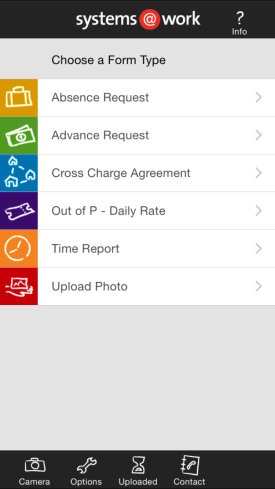
APPV2

There’s also one more challenge that ERP software authors face – how to manage the release of App versions. The problem is that ‘delivery’ is uncontrolled. Release an App to the App Store and everyone gets it almost immediately. It’s got to work first time for every Client who’s already using it irrespective of their configuration, and without a chance to run in test mode. This also implies that each new version must be compatible with prior versions of the core software. We’re still thinking about how to do that in the best possible way.
Just Three Days After Two Days to Go

Share

Yesterday we finally released Version 5 of time@work (expense@work and forms@work to follow shortly), just three days after we were only two days from completion. As I wrote on Monday, estimating and predicting in the area of software development is immensely difficult (Two Days to Go).

At systems@work we develop specialist software for professional services management, expense management and workflow. Our software is used all over the world.

PSWV5

Version 5 includes many improvements, though, inevitably, not as many as were on my list when we began our development work a year ago, and some improvements weren’t on my list at all. Priorities inevitably change from one month to another in response to the demands of customers and potential customers.

With every new release we must make advances on at least four ‘fronts’:

  • The ‘functional’ front. Every new release must be more capable than its predecessor.

We’ve made the calculation algorithm more powerful by enabling parallel sequences of calculations.

We’ve made it possible for invoices to be emailed directly to clients in Word, Excel or PDF format.

We’ve enabled drilldown ‘sub-reports’ from timesheets and forms.

And more.

  • The ‘technical’ front. Every new release must work with the latest operating systems, browsers, and devices.

We’ve added time capture to the capabilities of our App.

We’re shortly releasing an Android version of the App.

We’ve made some processes faster, such as invoicing and data import.

We’ve provided invoicing and data import capability in the browser. This means that end-users of time@work can now do everything in a browser:

Timesheets – submission and authorisation

Expenses – submission, authorisation and review

Forms – submission, authorisation and review

Approvals

Invoicing

Planning/Budgeting

Skills Matrix

Reporting

Data Import

Data Export

We’re therefore ever more ‘cloud’ ready.

We’re investing in ‘mobility’ by providing more options through our iPhone and Android Apps.

  • The ‘graphical’ front. We have to keep up to date with graphical fashion.

In this respect, we’ve still got some work to do. I have many faults, but one of them is certainly to think that in the end what matters most is what software DOES. I do believe that, and I probably don’t give enough weight to graphical considerations. But over the last months I’ve heard too many comments that our software is looking old fashioned, so over the next two months we’re going to modify the browser interface radically to bring it up to date.

  • The ‘usability’ front. We have to make our software ever easier to use.

We’ve made it possible to work with forms in ‘page’ mode as well as in ‘grid’ mode.

We’ve made it possible for end-users to import data into forms from Excel spreadsheets. This means that expenses, for example, can be entered into a spreadsheet offline and then uploaded.

We’ve added search capability and two-column lookups in the App.

But in this area , also, there is more to do. We’ll be looking at improvements in Planning and the provision of responsiveness in search tools so that searches are conducted as characters are typed.

I have a list of hundreds of suggestions from customers and colleagues, and I have lots of ideas of my own. Plenty of work to do!

Countdown – Two Days to Go

Share

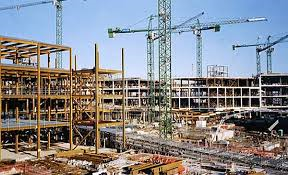
Building software isn’t necessarily more difficult than building a building or a tunnel. You don’t get wet, or get mud on your boots. You don’t work with dangerous machinery or risk falling from a high place. You don’t need a hard hat to write software, you just need a chair, a warm place, a mug of tea and a computer.

building site

You would think that there are fewer unpredictable things in the logical space in which we software developers work (barring the malfunction of other pieces of software that form part of the system – equivalent, I suppose, to malfunctions in materials that form part of a building). It’s not an exploration of unknown conditions, either. You don’t unexpectedly discover that a logical turn takes you into more difficult ‘logical’ space, whereas the digging of a tunnel might take you into muds of different textures and load-bearing capability.

Assuming that requirements don’t change, there should be nothing unexpected when you’re programming, and nothing should get in your way.

So, why is it so difficult to finish software systems on time?

Perhaps the answer lies in the fact that whereas a building is conceived fully before construction starts – its outline, its height, its weight, and all its components and how they’re to be put together – the details of a software system are ‘worked out’ as it’s developed. A full description of it would be the system itself. Perhaps it’s like the development of a mathematical proof. The destination, the theorem, may be known in advance, but the tortuous path towards it has yet to be described. The full description is the solution.

We’re just two days away, we hope, from releasing a new version of time@work. We’re late, of course. We should have been two days away some weeks ago (perhaps months, if I’m really honest). But I’m not complaining. This is the way development goes. We’ve moved the goalposts a little, we’ve found some things more difficult than we’d expected. We’ve reversed out of wrong turnings when the ‘final’ version of a new feature wasn’t as easy to understand and use as we’d imagined. We’ve sometimes not anticipated that a change in one part of the system would cause logical problems in others. Who can eliminate such issues from the software development process?

It happens every time. Even after years, our estimates are sometimes wildly inaccurate. I hesitate to abandon estimation, since in software development you must choose between priorities, and knowing how long something will take and therefore how much it will cost is an important component of that judgement. I’m still not ready to shrug my shoulder and go down the route of ‘It will take as long as it takes.’

But it’s wonderful to be just two days away (or three, or four, perhaps) from Version 5. It’s been a year since we produced a major new release, and this one contains some exciting new features. I’ll list them when we get there in a few days time but for the moment we’re doing final assembly and a bit of cleaning up.

  • We need a revised demonstration database to issue with the new version. Not only must all the data be updated from 2014 to 2015, but changes have to be made to illustrate the new possibilities in the software.
  • We need to update the system help text with text from the new complete reference guide to the product.
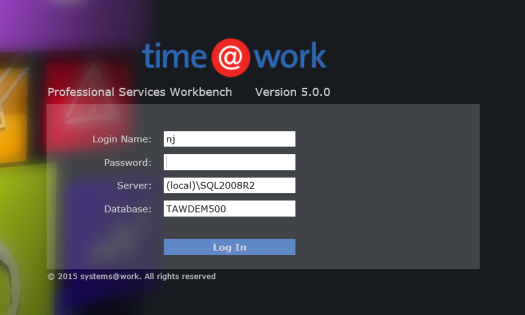
  • We need to make some final graphical adjustments (consistent fonts, colours, styles, new login screens).
  • We need to fix some final bugs.
  • We need to  run a ‘release check’ across the entire product to test as many functions as possible in as many permutations as time allows (testing all of them would take longer than the lifetime of our solar system).

We do this with a series of iterations of the product. The problem is that this means we’re tilting at a moving target. I received a new iteration on Friday and worked on it over the weekend. Everything that wasn’t working before worked, but one thing that worked in the previous iteration didn’t work in this one.

Perhaps just one more iteration, today or tomorrow, and we’ll be ready to release on Wednesday. Fingers crossed.

Developing a Software Package – Dream or Nightmare?

Share

In the world of business software development there’s nothing more fun and more challenging than designing packaged software, software that’s designed to adapt itself to the particular circumstances of each customer, without software modification. Basically you’re building software that’s packed with parameters and switches to make it work one way or another. This can be elegantly and well done if you get it right at the start, but if you’re led this way and that way by the demands of each particular customer, you can end up with a dog’s dinner.

software package

Either way, it’s an expensive venture. It costs more to develop this kind of software than code that’s designed for just one purpose, because it takes a lot more time, but the reward, when it comes, is that you can sell the same package time and time again. There’s just one body of code to look after. So, if you’re an expert in a particular area of business, and if you’ve got the right logical imagination, it’s surely an opportunity not to miss.

Or, so you might think.

I’ve done it myself. I’m the designer of systems@work, a single software package designed for professional services management (time@work), expense management (expense@work) and workflow (forms@work).

I’m typical of many a programmer who spent years writing one-off programs for specific businesses. I developed a practice management system for Coopers & Lybrand, in Paradox, from scratch, and adapted another software package for KPMG for the same purpose. So it occurred to me, as it does to so many of us, that if I could only distil what’s common from all the code I’d written or adapted, I could design a single all-purpose package that would, with appropriate parameters and switches, do everything all at once.

People like me dream of a few months’ fervent coding, and then, almost immediately, a crowd of buyers. We dream of license and maintenance revenues rising exponentially, and finally, at the end of the rainbow, a buy-out proposition from an enormous corporation (preferably beginning with M). The rest is a pleasant after-life that won’t involve work.

We know we can do this. We, alone, have that very special idea. We’re up to date with the latest technology. Why not begin at once?

But if you wake up one morning in the after-glow of a dream like this, then close your eyes and dream of something more sensible, like winning the Singles Title at Wimbledon. Only if the dream returns incessantly, and if it survives all the scepticism you can throw at it, should you begin to take it seriously.

But before you spend every last penny of your own or your company’s money, have another cold shower or two and ask yourself some questions – at least sixteen of them.

Here are the first three:

  1. Who are your customers?

There’s a world of difference between the package software market and the market for custom-developed software. Your customers are going to be those who realize that there’s ultimately more security in a general purpose package that’s going to adapt and grow with their business, than in a piece of one-off code for which support may not be eternal.

They’re going to be customers who understand that they won’t use everything the package does, and who will compromise their own needs if the fit is good enough. They are simultaneously buying more than they need, and less. So be ready to sell the idea of compromise. Beware of promising a long list of enhancements to every customer who’s interested, because If that’s the route you choose, you’ll end up with an ugly amalgam of cobbled-together code.

  1. Who are your competitors?

If your customers have decided on a package, then they’re not only going to look at yours. Let’s face it, most software markets are pretty saturated already. At the top end there’s Oracle and SAP, and if you’ve got enough money to buy them, those systems will do just about anything you need. But even if your customer is in the mid-market, then there’s still a crowd of mid-market systems for him to choose from. Does Navision, or SunSystems, or Great Plains, or Exact, or Scala already do exactly what you’re thinking of? Or nearly do it? It’s unlikely that you’re going to write a complete system that covers a company’s needs from payroll, to accounting, CRM, manufacturing, and distribution.

You’re insane if you’re going to embark on a completely new package that fits the ‘integrated’ model. Rather you’re going to be going for the ‘best of breed model’, with the idea that your piece of software is so special that your customers won’t mind fitting it into a tangle of other modules from other package systems. So whatever else you do, make sure you design open interfaces to a broad range of third-party products.

And keep asking yourself, do you really have some special knowledge that will make your software special?

  1. How are you going to make it simple enough but flexible enough to fit a broad range of customer needs?

This is the difficult part to get just right. If you’re going to appeal to sufficiently large numbers of customers to cover your investment, your package is going to be complex. It’s going to have screens of parameters that make it work one way for one customer and another way for another. After all, if it’s a package, you’re only writing one piece of code. If you end up with multiple versions for multiple needs, then your dream will become a nightmare before you’ve even sold five copies. So, think about your market, and choose just enough of it to make your coverage sufficient whilst making it possible for your customers to understand the software they’re buying.

More questions in a day or two…

Designing systems@work – with a little inspiration from SunSystems

Share

I’ve spent the last few years designing systems@work’s time@work (for professional services management), expense@work (for expense management) and forms@work (for forms and workflow management), three highly configurable software packages all inspired by SunSystems financial and business software.

s@w small

SunSystems was developed by colleagues of mine who formed Systems Union in the 1980s. It’s still the mainstay of LLP Group, a SunSystems reseller and consulting group which I founded in Prague in 1992.

SunSystems’ excellence lies in a few remarkably simple concepts:

  • A single ‘unified ledger‘ handling accounts payable (AP), accounts receivable (AR), general ledger (GL) and fixed asset ledger transactions. Accounts of types Creditor, Debtor, Client (both Debtor and Creditor), Profit & Loss, Balance Sheet, and Memo accounts all co-exist in a single chart of accounts. The unified ledger idea actually spawned at least two well-known accounting software systems – CODA, and SunSystems, both British.
  • The use of transaction analysis codes instead of structured general ledger codes for the purposes of management accounting and statutory reporting (VAT reporting, for example). An analysis code need be set up only once, and then selected and posted during journal entry to any account that is defined as requiring it. The chart of accounts thereby remains simple.
  • The option to set up additional analysis on other entities (such as Account Codes and Asset Codes) for reporting purposes (this makes the translation of reports from corporate to local account codes easy, or vice versa)
  • The use of parallel ledgers for budgeting or alternative treatments (e.g. alternative asset depreciations). Each user-definable budget ledger has the same structure as the ‘Actuals’ ledger.
  • The option to enter ‘other amount’ and ‘currency code’ values on any transaction in any ledger (in the latest version of SunSystems you may enter five amount fiels and four currency codes)
  • The use of additional ledger fields for asset codes, etc.

The result is an extremely simple, easy to understand, ‘flat’ structure (reflected in a non-normalised database) that is nevertheless extremely powerful and flexible. In terms of database tables, the essentials include:

  • A Chart of Accounts table
  • Ledger tables (an ‘Actuals’ ledger and a number of parallel ‘Budget’ ledgers)
  • Optionally, a Fixed Assets table

Everything else is merely supportive.

The advantages are many:

  • No issues reconciling AP, AR and GL
  • Reporting tools that can range easily across transactions on any type of account and in any set of ledgers
  • It’s easy to set up new analytical dimensions at any time
  • It’s easy to handle multiple currencies (typically local currency values that must balance, transaction currency values (e.g. foreign expenses), and reporting currency values (enabling consolidation of several ledgers in a single corporate currency)

The product was also designed with language translation in mind – all textual terms being held in files external to the program files.

It’s not surprising that SunSystems remains an excellent choice for corporations planning to use a single system across the globe. It can be rapidly implemented in a standard way, meeting corporate and local requirements simultaneously.

I spent many years implementing SunSystems in many parts of the world and came to appreciate the powerful simplicity of its design. In designing time@work I adopted many of these ideas and in some cases took them one, necessary, step further:

  • A single ‘Actuals’ ledger containing transactions of all kinds, whether originating in timesheets, forms, invoices, or attendance forms
  • Any number of parallel ledgers of exactly the same structure for planning and other purposes
  • Analysis values on transactions (the same set of 50 dimensions available for use on timesheets, forms, and invoices across all ledgers)
  • Analysis on entities (Clients, Projects, Tasks, Employees)
  • Multiple value fields on each transaction (20 values, and 20 ‘currency’ codes to identify the currency in which each value is expressed)
  • Reporting tools that can range across multiple ledgers
  • Data Dictionaries accessible to the end-user where different language texts are held, as well as industry specific textual alternatives (e.g. engagement, or case, instead of project)

Where I extended the design was to enable multi-company functionality in a single database, making it possible for an organisation to define one set of projects and one set of employees for use group-wide. In a professional services organisation this makes it easy for an employee belonging to one company to report time or expenses against a project belonging to another company, and makes it possible for an employee in one company to manage employees and projects in another, and to be involved in workflow regardless of the company to which an employee or project belongs.

Multi-company capability, though, implies at least the following:

  • The need to handle multiple base currencies (an organisation may be operating in several countries but may still need to see employees and projects as a single pool). Holding the currency code on each of twenty values in every ledger transaction makes this possible.
  • The need for multiple charts of accounts. When transactions must be sent from systems@work software to one or more finance systems the appropriate transactions for each company must be easily identifiable and must be constructed using the appropriate account codes for the destination ledger
  • The need for separate invoice sequences
  • The need for separate sets of expense types, each appropriately implying a general ledger code

Achieving all of this, whilst retaining simplicity on the surface has been our aim. The result is a set of simple components that can be assembled in millions of different ways to meet the needs of a wide range of organisations, without software modification.

systems@work works with any finance system, but it’s conceptual similarities with SunSystems makes it an ideal extension for timesheets, expenses, planning and billing. Contact me for more information.

On Integration – Developing Software with Integration in Mind

Share

I’ve posted two articles on the challenges of systems integration, firstly on the advantages and disadvantages of Best-of-Breed and Fully Integrated Solutions, and secondly on how to approach integration if you’ve chosen Best-of-Breed.

See Systems Integration and Reducing the Risks.

This post is concerned with how software should be developed if integration is anticipated.

integration3

You can think of it in this way:

Systems respond to EVENTS by executing software PROCESSES that update DATA.

In a single ‘fully integrated’ system the ‘complete’ response to an EVENT is contained entirely in one system and is reflected in one set of DATA. ‘Fully integrated’ systems can thus always ensure a complete response to an EVENT or no response, but are rarely left in an incomplete state resulting from partial processing. Typically, databases roll back incomplete PROCESSES, and all the consequent DATA changes, if there is a failure at any stage. It’s all or nothing, if you want it to be.

Integrating best-of-breed systems, working with more than one database, makes it more difficult to achieve this kind of integrity. The failure of a PROCESS in one system can’t easily trigger the roll-back of a PROCESS in the other.

Integrating separate systems requires therefore that you should easily be able to identify the success or failure of each part of a PROCESS and identify and control each set of DATA changes that each PROCESS effects.

For example, suppose you’re a company that distributes imported goods and you’re obsessive about calculating the margin you obtain on each product (this may be for good statutory tax reasons, or simply because you are unnaturally pedantic). The cost of the goods you sell is determined by the price you pay for them, the duties you pay on importing them and the cost of transporting them to your warehouse. You only know the true cost of each product once you’ve received the invoices that make up all of these costs. But, in the meantime, you may have shipped them.

Let’s consider an EVENT such as the arrival of an invoice for transportation. If the calculation of ‘actual’ costs is automated then your system must carry out the following PROCESSES:

  1. Invoice Registration: The invoice is booked against supplier, tax and cost accounts.
  2. Accrual Reversal: If an accrual for this cost has been made earlier it must be reversed.
  3. Stock Value Correction: The difference between accrued and actual transportation cost must be calculated and allocated against all the stock items it is related to.
  4. Cost of Goods Sold Correction: If there are items to which this difference in cost relates that have already been sold, then the appropriate portion of this difference must be allocated to a cost of goods sold account rather than to an inventory account.

Each step involves updating transaction tables, and if all these PROCESSES are occurring in a single integrated system then either they all succeed or they all fail, and the database either reflects a complete response to the EVENT or no response at all.

But if your finance system is separated from your manufacturing system then some of these PROCESSES must be carried out in one system and some in the other (and parts of some in both). It’s likely also that they will take place at different times (if there is ‘batch update’ of one system by the other rather than immediate update). It doesn’t matter for the moment which. In consequence it is possible that taken together the systems may reflect a partial response to an EVENT.

When developing systems that must be capable of handling partial failure in response to an EVENT the following approaches are wise:

  • Ideally there should be an explicit database table that identifies for each uniquely identifiable EVENT the PROCESSES that have been completed successfully and which are therefore fully reflected in the system’s database. Ideally such tables are present in the system that is sending and the system that is receiving. In reality, it is the state of the data that implies whether a PROCESS is complete, and it is rare to find an explicit table that records this separately, but it would certainly be useful. However the success of each PROCESS is recorded, the changes in data associated with each PROCESS should be easy to identify.
  • Transaction data that have been processed by an interface program must be marked as such.
  • All modifications to data that imply additional interface processes should be handled with a full audit trail. Ideally a modification to a transaction involves the insertion of both a reversal of the earlier transaction and a new transaction.
  • All transactions should have a field that identifies the order of events. Ideally this should be a date/time stamp. This enables execution of interfaces in the correct sequence, as well as the unwinding of PROCESSES if required.

If these safeguards are observed reconciliation and correction should not be too difficult.

System integration isn’t easy and there is no reason to believe it will get easier. There are still no standards for the description of data to which all system developers and integrators can refer. This is no surprise. Data are not objective objects which can be explored and described without reference to purpose, context and culture, and they never will be. They are not like the objects of material science; they are human artefacts.

Over the last decades I have witnessed a number of false dawns with regard to ‘easier integration’. These usually turn out to be useful advances in technology but rarely make functional integration any easier.

Two weeks ago I read an article on Data-centre Software in The Economist (Sept 19th 2015). That’s what made me think about integration issues. The article mentions Docker, a successful startup that’s making it easier and more efficient to move applications from one cloud to another. Laudable, clever technology, but, as far as I can tell, it represents no progress in the more difficult task of integrating business processes. Those of us who do such work can be assured of work for many decades to come.

Mutual Frustration – Why do IT systems users wait so long for features that already exist?

Share

I attended a conference recently where, by chance, I met someone who’s using the expense management system that I design – expense@work.  It’s always a little alarming when you meet a real user since you must expect them to be honest, and there are no better judges of what you’ve done. This one was direct:

‘I hate it,’ he said, with the kind of mock fury that told me that he knew he was exaggerating and didn’t really want me to go away and kill myself.

‘Why?’ I asked.

‘Well, it’s so out of date. I can’t attach images to my expense claims, and I can’t use it on a mobile device,’ and so on.

‘But you can,’ I said. ‘We’ve had those features for years.’

‘Then why haven’t we got them?’

‘I don’t know.’

frustration

It’s so frustrating, but this happens time and time again. And not only with our own software. We also sell and implement a financial system, SunSystems, and again, we often have to deal with users who want features that we have, but who aren’t getting them.

This is actually a widespread problem in system implementation and the end result seems to be unnecessary reputational damage for the software author.

Why does it happen and how can it be avoided?

It happens because system implementation is a lengthy, expensive and risky business and end users don’t often determine what’s on the list of features that they’re going to get. Sponsors and project managers on the client’s side have a highly controlled, and usually narrow, list of objectives, and their criteria of success won’t usually include the implementation of features that are merely ‘nice to have’ but not necessary.

That’s why ‘nice features’ don’t make the list during an initial implementation, but it doesn’t explain why nice new features don’t get implemented later as soon as they become available.

The problem is that once a system is implemented, the policy becomes ‘if it ain’t broke, don’t fix it’, so new versions with ever more up-to-date features, don’t get implemented either. And this is eminently sensible, because upgrades take time, often go wrong (for a while at least), and cost money. Upgrade projects are sometimes almost as large, expensive and risky as initial implementation projects, even if the software automates many aspects of the upgrade (such as updates to the database).

Software authors want their software to be liked by their end users. End users want ‘nice’ features. The obstacle lies between the two, in the conservatism of the client’s project managers and IT department.

Sadly, I can’t see what’s wrong with this. ‘Conservatism’ is a very sensible policy with business systems. The tragedy is that result is frustration on one side and unhappiness on the other. is there anything we can do about it?

I ask this question without knowing the answer. I wish I could find a way to deliver new features in software without risk or disturbance. But this is difficult. Business software isn’t like a desktop productivity tool. The problem is that what you do in one corner of the system can have unintended consequences in another corner. And when a system is implemented for a client it’s often integrated with lots of other systems, so a change in one corner of our part of the whole, can disturb a corner in another part that isn’t within our control, as authors of just one part, at all.

To some extent this problem is solved in ‘cloud’ or ‘hosted’ solutions, because authors then control the version that an end-user uses, and can introduce and publicise new features without obstruction from intervening project managers.

But ‘cloud’ and ‘hosted’ solutions aren’t always suitable when it comes to complex business software, especially when the software must be integrated with a client’s own systems. When there is deep integration, conservatism rules, and must do so.

And yet, it’s so frustrating to meet end-users and to have to repeat time and time again,’But our software CAN DO THAT!’

Any ideas?

There but for the Grace of God….

Perhaps a software designer should rejoice at the discomfort of his or her rivals (we all enjoy the thrills of schadenfreude from time to time), but I couldn’t help feeling that ‘there but for the Grace of God go I’ when I read this scathing account by Lucy Kellaway of her experience with Oracle’s iExpenses.

Doing Expenses is Truly Loathsome

She speaks for many when she writes:

There is something about doing expenses that has always been loathsome, even in the old days when all you had to do was fill in a few columns on a sheet of A4. There is the dispiriting matter of emptying pockets and handbags in search of missing receipts – as well as the existential uncertainty about what it is OK to claim for.

I remember seeing a survey saying that many office workers would rather scrub the company’s lavatories than do their expenses. I’d go further still. Not only would I rather scrub loos, I’d rather have a root canal.

Designing business software isn’t easy at all, and sometimes you strive with all the imagination you posses to design and build something that’s easy to use, and still end up creating a monster. Software designers are often people like me who’ve spent their careers programming software, or configuring other kinds of business software, generally for those forgiving kinds of people who work in accounting or other administrative departments. They’re nice people – and nerdy.

What we fear the most is ‘ordinary people’ or, worse still, ‘children’, who aren’t technical experts and rely on their instincts. They’re like the child who points out that the emperor had no clothes. And expenses software is the kind of software that ordinary people have to use.

But we must listen to ordinary people. If you’re a software designer you must let others help you with the graphical and logical design (what happens next when you click this or that button), and you must embrace that appalling moment when you put your software into the hands of someone who doesn’t know it at all, isn’t a software expert and isn’t someone predisposed to be kind to you, such a parent or a partner (perhaps your own children are the best candidates in this respect). You must watch what they do and force back the thought that they’re stupid or that it’s obvious what they ought to do. You have to be horribly humble, accept criticism and start again, if that’s what’s needed. It’s hard to bear.

s@w

I like to think that Lucy Kellaway would like our expense@work system more than she likes Oracle’s iExpense, and I’d welcome the opportunity to show it to her. But if you’re afraid of a journalist, think of the 650 MPs who use expense@work for their Parliamentary expenses in the UK. A more demanding and terrifying set of users you cannot imagine, but they seem to put up with it, more or less (well, they have to!).


We’ve released a new App – systems@work – to the App Store

Share

We’ve released Version 1.3 of our iPhone App to the App Store and it’s now available for download.

After some reflection, we decided to release the App as systems@work, rather than as expense@work, forms@work or time@work. This reflects the fact that the App works with forms created in any of these three products, adapting itself, when first used, to the form types and rules set up in your database.
s@w - IMG_2172

The expense@work App will therefore shortly be withdrawn from the App Store.

Version 1.3 contains new features:

  • revised data communication with the server for faster and more reliable transfer
  • optional automatic upload of data

We are now adapting the App for the Android environment.

When the Blood Boils

‘It’s just business, nothing personal.’

How I hate to hear those words. Business is personal, at least partly because we spend a large portion of our lives conducting it. Human relationships are at the heart of it. And there’s far more to a business relationship than a contract – trust, for a start, and possibly liking and pleasure.

We’re not in business only to make money or even to do good in the world. Business is part of life, and the extended community we live in. We need to feel proud of it.

Procurement departments should take note of this when they are unleashed on suppliers.

baying dog

Procurement doesn’t have to look like this!

Yesterday’s experience is a good example of bad practice. It’s for you to judge whether mine or the potential customer’s.

In the last few weeks, I’ve spent days and days working out how to use our expense management system, expense@work, for an interesting and unusual purpose. It’s been fun. There’s nothing I enjoy more than working out some tricky logical problem and fitting the features of our software around something unlikely.

With this particular company, we got to the point where the system I’d configured looked entirely plausible (and indeed is entirely plausible). I’d swapped requirements documents, sample data, queries about the rules of the system, and had reached the point where I could demonstrate to them quite clearly that the system could do what they wanted.

So, once convinced, they were ready to unleash their procurement department to negotiate a deal. We’d already agreed, informally, an absurdly low price, which seemed all the more ridiculous as the complexity of their requirements increased, but it was still just about worthwhile.

Their procurement department then announced that their maximum daily consulting rate was about 30% of the very reasonable rate I’d suggested. Moreover, they wanted an unlimited license for far more users than I’d agreed.

I found this more than slightly infuriating, so, blood boiling, and unable to stop myself, I replied as follows:

‘You’re a cheapskate company, with an insulting approach to procurement, and I want nothing more to do with you.’

I have no regrets.