Why Consultants Love SunSystems

Share

There was a time, many years ago, when the future of SunSystems was uncertain, though everything looked wonderfully rosy at the time. Systems Union, the British company who developed the product, was still in friendly private hands, and sales were booming. SunSystems was the best (as it still is) international financial software system on the planet. Those of us whose lives depended on the product were prospering. Actually, Systems Union’s  P&L looked good. The problem, the company’s balance sheet, was probably one of inattention. The sails were billowing, the sun was shining. They just didn’t notice the rocks beneath the surface.

Resellers such as our company (LLP Group) enjoyed unusually comfortable payment terms and Systems Union’s dunning style was gentle and ineffective. It was a cosy, successful, touchy-feely company and we were all one happy family. They even took all of their employees on expensive foreign holidays, and, on one occasion, some of us resellers too.

They had also embarked on huge enhancements to SunSystems, both functional and technical. GUIs were new and improving rapidly (yes, we’re talking about many, many, years ago) and COBOL, which they were using them, was an impediment to some of this. All these development projects were late and ever more expensive programmers were being thrown into the development den.

And then there came huge devaluations in Asian currencies and debtor and cash values at Systems Union’s successful Hong Kong offshoot had to be revalued down. All in all, the balance sheet didn’t look good, however bright the operating profit.

So, many resellers looked for lifelines, just in case. We looked at SAP R3. As it turned out, this was an expensive and very instructive mistake.

barbie and ken

It would be wrong to suggest that I had thought of SunSystems as a toy. Its simple and elegant building blocks come in a relatively small kit, but, just as with Lego, you can build nearly everything with them. But I had certainly thought of SAP R3 as a ‘grown up’ product, and just as when we’re young we dream (foolishly) of getting ‘grown-up’ versions of toy cars, toy guns and Barbie dolls (or Ken), so I had assumed that our consultants would enjoy the upgrade to SAP R3, a chance to become adult in the ERP consulting world.

SAP was then trying (it still is, perhaps) to come down in the world by selling to mid-sized companies rather than only to the largest ones, so they leapt at the opportunity to work with a company such as ours who knew how do deliver projects in under hundreds and thousands of days.

So we sent out best SunSystems consultants on SAP R3 courses. This one would learn about the inventory control module, this one about the sales module, that one about the asset register, and so on. And therein lay the problem and the reason why our consultants, unexpectedly, hated the whole experience.

Their worlds shrank, and their horizons shortened.

The wonderful thing about working with SunSystems is that you can know the whole product, understand the whole of the company you’re working for, and design a complete solution. You can see from one end of an organisation to the other, from sales discount policy to the resulting debits and credits, and the management reports that international managers need. This wasn’t the case with SAP R3. You just couldn’t know everything.

And the style of the product turned out to be different too. It may be an imprecise analogy, but if SunSystems is like Lego, a small number of small components from which you can build just about anything, SAP R3 is more like a vast array of very large fixed-purpose machines that you have to put together, joining up all the wires and cogs and panels, unsure if they really fit together. The consultant who knows this machine, doesn’t know the others.

Those of us who work with SunSystems love its simplicity and the infinite possibilities that follow from it. Consultants can use their imagination to configure what the customer needs, albeit sometimes with workarounds (equally necessary in SAP R3 I believe). There’s no coding to do, unlike with SAP R3, and in any case coding isn’t possible.

Customers love it too. In some cases they’ve even ‘downgraded’ from SAP to SunSystems. In other cases, when they’ve grown and ‘grown up’ into SAP R3 they express nostalgia for the flexibility and relatively low cost of ownership of SunSystems.

SunSystems is an ideal consulting product. If you’re proficient in it it’s like a musical instrument on which you can play any tune. I’m happy to say that all of those SAP R3 consultants we thrust into adulthood are back in the SunSystems world, and all the happier for it.

See LLP International.

And when I came to design our own products – time@work for professional services management, and expense@work for expense management – I took inspiration from SunSystems and not SAP. I designed it as a set of building blocks, like Lego.

systems@work App – A New Version

Share

Learning how to develop and manage Apps has been a difficult and essential experience for our development team at systems@work. ‘Mobile’ is the buzzword these days, even if last week it was ‘Cloud’.

We recognised three or more years ago that we needed to develop an App for our largely browser-based ERP software – time@work for Professional Services Management, expense@work for Expense Management, and forms@work for forms workflow management. In some ways it’s not easy for traditional ERP developers and consultants such as we are to learn the new tricks of the App world, but if you’re in the business of packaged ERP software you’ve got to keep up with technology and be near the leading edge, if not quite at the edge itself. Just as the browser revolution demanded that we think in a different way both technically and in terms of user experience, so the App imposes new demands. Apps must be even easier to use, indeed almost a joy, manipulable with a single finger or thumb. But making the complex seem easy is always a challenge with complex business applications.

The tradition with Apps is always keep it simple, or, rather keep it looking simple and easy to use.  Specialist terminology must be avoided, and functions must be intuitive and easy to use. The space you have to work with is small, but nothing must look cramped. Obviously there’s no point in crying RTFM when users complain that they don’t know what to do next. If your Granny can’t use it, you’ve probably failed the keep it simple rule.

granny

But ERP systems are complex, and our systems@work software is highly configurable. It’s all about forms – forms for expenses, forms for absence requests, forms for recording time on projects, forms for stock movements, forms for this and that. You can configure a form to do any number of things, offering different fields with different lists of items, calculations with different rules, and so on. You can also attach photos and record voice memos and use forms in any number of different languages. You can also set up any number of form types and control who sees which ones.

All the lists, labels, definitions and rules that form types need are held by our system in a central database. So we have to make everything work with a single App, an App that can read and download these rules and interpret them on your mobile device. Moreover we need to make this download work swiftly. You can’t keep Granny waiting.

Apps must also work whether you’re online or offline. Actually, that’s not a necessity, but given that the rules that govern forms must be downloaded to the simple database that sits inside your mobile, then why not? Some of our users have been clamouring for years for a way to enter their expenses offline whilst flying, for subsequent upload in the Arrivals Hall. So it was part of our plans to produce an App that could be used offline as well as online.

We set ourselves these objectives:

  • Our App must be easy to use
  • Our App must look good
  • Our App must work with any configuration of our software
  • Our App must work offline and online
  • Our App must be fast in terms of upload of data and synchronisation

iPhone technology is very different from the Microsoft technology we were used to, and we had a difficult choice, either to find an iOS expert and teach him or her how our system works, or retrain one of our programmers on iOS technology. We chose the latter but had recourse to App expertise when we needed it. Even so, it took nearly 18 months to develop the first version of our App, together with all the server-side web services we need to serve it.

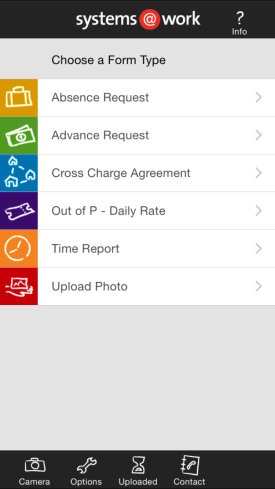
Take up is gradual but accelerating, and yesterday we released Version 2.0, taking account of immediate feedback from our users. We’ve improved usability, extended the use of the App to include form authorisation, and improved graphics. In the coming weeks we’ll release an Android version, and in the coming months a Windows Mobile version.

APPV2

There’s also one more challenge that ERP software authors face – how to manage the release of App versions. The problem is that ‘delivery’ is uncontrolled. Release an App to the App Store and everyone gets it almost immediately. It’s got to work first time for every Client who’s already using it irrespective of their configuration, and without a chance to run in test mode. This also implies that each new version must be compatible with prior versions of the core software. We’re still thinking about how to do that in the best possible way.

Just Three Days After Two Days to Go

Share

Yesterday we finally released Version 5 of time@work (expense@work and forms@work to follow shortly), just three days after we were only two days from completion. As I wrote on Monday, estimating and predicting in the area of software development is immensely difficult (Two Days to Go).

At systems@work we develop specialist software for professional services management, expense management and workflow. Our software is used all over the world.

PSWV5

Version 5 includes many improvements, though, inevitably, not as many as were on my list when we began our development work a year ago, and some improvements weren’t on my list at all. Priorities inevitably change from one month to another in response to the demands of customers and potential customers.

With every new release we must make advances on at least four ‘fronts’:

  • The ‘functional’ front. Every new release must be more capable than its predecessor.

We’ve made the calculation algorithm more powerful by enabling parallel sequences of calculations.

We’ve made it possible for invoices to be emailed directly to clients in Word, Excel or PDF format.

We’ve enabled drilldown ‘sub-reports’ from timesheets and forms.

And more.

  • The ‘technical’ front. Every new release must work with the latest operating systems, browsers, and devices.

We’ve added time capture to the capabilities of our App.

We’re shortly releasing an Android version of the App.

We’ve made some processes faster, such as invoicing and data import.

We’ve provided invoicing and data import capability in the browser. This means that end-users of time@work can now do everything in a browser:

Timesheets – submission and authorisation

Expenses – submission, authorisation and review

Forms – submission, authorisation and review

Approvals

Invoicing

Planning/Budgeting

Skills Matrix

Reporting

Data Import

Data Export

We’re therefore ever more ‘cloud’ ready.

We’re investing in ‘mobility’ by providing more options through our iPhone and Android Apps.

  • The ‘graphical’ front. We have to keep up to date with graphical fashion.

In this respect, we’ve still got some work to do. I have many faults, but one of them is certainly to think that in the end what matters most is what software DOES. I do believe that, and I probably don’t give enough weight to graphical considerations. But over the last months I’ve heard too many comments that our software is looking old fashioned, so over the next two months we’re going to modify the browser interface radically to bring it up to date.

  • The ‘usability’ front. We have to make our software ever easier to use.

We’ve made it possible to work with forms in ‘page’ mode as well as in ‘grid’ mode.

We’ve made it possible for end-users to import data into forms from Excel spreadsheets. This means that expenses, for example, can be entered into a spreadsheet offline and then uploaded.

We’ve added search capability and two-column lookups in the App.

But in this area , also, there is more to do. We’ll be looking at improvements in Planning and the provision of responsiveness in search tools so that searches are conducted as characters are typed.

I have a list of hundreds of suggestions from customers and colleagues, and I have lots of ideas of my own. Plenty of work to do!

Countdown – Two Days to Go

Share

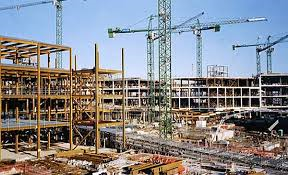
Building software isn’t necessarily more difficult than building a building or a tunnel. You don’t get wet, or get mud on your boots. You don’t work with dangerous machinery or risk falling from a high place. You don’t need a hard hat to write software, you just need a chair, a warm place, a mug of tea and a computer.

building site

You would think that there are fewer unpredictable things in the logical space in which we software developers work (barring the malfunction of other pieces of software that form part of the system – equivalent, I suppose, to malfunctions in materials that form part of a building). It’s not an exploration of unknown conditions, either. You don’t unexpectedly discover that a logical turn takes you into more difficult ‘logical’ space, whereas the digging of a tunnel might take you into muds of different textures and load-bearing capability.

Assuming that requirements don’t change, there should be nothing unexpected when you’re programming, and nothing should get in your way.

So, why is it so difficult to finish software systems on time?

Perhaps the answer lies in the fact that whereas a building is conceived fully before construction starts – its outline, its height, its weight, and all its components and how they’re to be put together – the details of a software system are ‘worked out’ as it’s developed. A full description of it would be the system itself. Perhaps it’s like the development of a mathematical proof. The destination, the theorem, may be known in advance, but the tortuous path towards it has yet to be described. The full description is the solution.

We’re just two days away, we hope, from releasing a new version of time@work. We’re late, of course. We should have been two days away some weeks ago (perhaps months, if I’m really honest). But I’m not complaining. This is the way development goes. We’ve moved the goalposts a little, we’ve found some things more difficult than we’d expected. We’ve reversed out of wrong turnings when the ‘final’ version of a new feature wasn’t as easy to understand and use as we’d imagined. We’ve sometimes not anticipated that a change in one part of the system would cause logical problems in others. Who can eliminate such issues from the software development process?

It happens every time. Even after years, our estimates are sometimes wildly inaccurate. I hesitate to abandon estimation, since in software development you must choose between priorities, and knowing how long something will take and therefore how much it will cost is an important component of that judgement. I’m still not ready to shrug my shoulder and go down the route of ‘It will take as long as it takes.’

But it’s wonderful to be just two days away (or three, or four, perhaps) from Version 5. It’s been a year since we produced a major new release, and this one contains some exciting new features. I’ll list them when we get there in a few days time but for the moment we’re doing final assembly and a bit of cleaning up.

  • We need a revised demonstration database to issue with the new version. Not only must all the data be updated from 2014 to 2015, but changes have to be made to illustrate the new possibilities in the software.
  • We need to update the system help text with text from the new complete reference guide to the product.
  • We need to make some final graphical adjustments (consistent fonts, colours, styles, new login screens).
  • We need to fix some final bugs.
  • We need to  run a ‘release check’ across the entire product to test as many functions as possible in as many permutations as time allows (testing all of them would take longer than the lifetime of our solar system).

We do this with a series of iterations of the product. The problem is that this means we’re tilting at a moving target. I received a new iteration on Friday and worked on it over the weekend. Everything that wasn’t working before worked, but one thing that worked in the previous iteration didn’t work in this one.

Perhaps just one more iteration, today or tomorrow, and we’ll be ready to release on Wednesday. Fingers crossed.

Clouds – Nimbus, 9, or Cuckoo?

Share

I am distrustful of bandwagons, and rarely board them as they rattle noisily by. It’s not that I’m against enthusiasm, or novelty, it’s just that bandwagons are often driven with irrational exuberance, and very often they crash. I prefer the slower vehicles that come along behind. They set out in the same direction, but with more care and circumspection, and they reach their destination more reliably.

bandwagon

I remember the bandwagon of the Dotcom boom – and the bust that followed it. Whilst there’s no doubt that the internet changed our lives, I’d rather call it accelerated evolution than revolution. Its victims were more often its most ardent supporters, hell bent on delightful ideas that lacked even a modicum of commercial good sense or realism, than the ancien regime.

The advent of the internet was evolution. It simply extended what we already had, and what we already did as business IT consultants. It didn’t, despite the fears of some, invalidate what we already knew. Business systems nestle as comfortably in the internet as they previously did in their more confined circumstances. The basic problems of system integration, of manufacturing, retail, services, accounting, distribution, CRM, and the rest, are of the same type as before, as complex as ever and we, who understand them, are as valuable as ever.

During the feverish years of the dotcom boom one of my colleagues told me that if we weren’t immediately reborn as ‘Dot LLP’  (instead of LLP Group) we’d be annihilated within six months. I laughed. We didn’t, and we’re still going strong. We learned some of the new dotcom tricks, and we go on learning.

thecloud

The Cloud, I fear, is currently another bandwagon. We won’t be boarding it with too much haste, even if its direction is the right one. We’ll be waiting for the slower train that won’t go off the rails.

The Cloud is an excellent idea. It comes in many forms. As those who tout it say, it allows businesses, even software authors such as we are (systems@work) to concentrate on what we do best. The business of managing IT infrastructure, handling communications, backups, performance, security, and so on, isn’t the business that most of us are in. It’s not our field of battle, so better to leave it to the experts. No need to employ specialists if others can do the job at a competitive price and relieve us of unproductive anxiety. We must concentrate on our core business activities.

All of that is true, and if we could all dump our systems onto rented hardware at reasonable cost, why not? Sometimes it’s possible and the right thing to do.

But that’s not exactly what the Cloud is meant to be. Certainly not all it’s meant to be. It’s not just a matter of hosting the particular collection of business software that we’ve amassed and integrated, it’s also about using a standard piece of software in a ‘multi-tenanted’ environment – one size, one copy suits all. And if we use this piece of software for accounting, this piece of software for distribution, and that piece of software for manufacturing, it may be about using multiple standard pieces of software in a number of different Clouds. It’s about business software becoming a commodity that can be accesses as easily as water through a tap.

Many business worry about the security of their data. But these issues of security are solvable, even if many companies are reluctant to let the ‘professionals’ look after their data. The fact is that data are vulnerable wherever they’re located, whether in-house or hosted, and the issues of security can be solved or not as easily in one environment as the other.

It is the issue of ‘standard software’ and ‘integration’ that don’t yet fit perfectly well within the Cloud. Sometimes, if the purpose of a piece of software is such that it can stand alone and if it’s used without alteration (even if configured for a particular company’s purposes) the Cloud can be a good place to put it, but if standard software has been modified, or extended, or is integrated in complex ways with other pieces of software, and other databases, then making this work with a Cloud-based solution will be difficult, and with a ‘pure’ multi-tenant Cloud based solution (one copy of the software serving everyone) it will be well-nigh impossible. Ensuring the consistency and coherence of systems and databases that are in multiple environments that you do not fully control will be difficult.

As time goes by, new techniques for integration may make this task easier, but we we’re not yet at that destination.

So, I am cautious about Cloud-based offerings in the world of business IT. They may work for some, but for many they aren’t yet the right solution. What seems initially like a good idea founders when a business needs something special from a standard software offering, or some special way of interfacing systems, and many businesses find themselves trapped by the choice they’ve made if it’s located in the Cloud. They’ve exchanged one limitation – the anxiety of running their own infrastructure – for another – the anxiety that comes from being limited by someone else’s standard software and infrastructure.

Whilst the provision and management of infrastructure isn’t usually the basis of a company’s competitive edge, the business software on it, often is.

As a software author (systems@work) we’re cautious. We offer configured systems in a hosted environment, and this suits customers who don’t need any software modifications and who don’t need interfaces between Cloud-based and non-Cloud systems, or who need only simple ones. And we offer on-premise installation and full-blown integrations when they’re needed.

But for now, the Cloud isn’t always the answer and we won’t be betting the business on it.


Bond, where is that Timesheet?!

Share

I saw Spectre last night. It was utterly awesome, as I’d expected. Indeed, the Bond series goes from strength to strength. Perhaps it lacked the emotional range of Skyfall, and in particular, those moments of poignancy with which the film ended, but Spectre, just like its predecessors, is brim full of realistic and tasty ingredients – suspense, violence, innate evil, fast cars, gadgets, elegance, intimacy, torture and a soupcon of British humour. Director Sam Mendes lovingly recreates the old clichés and conventions, but despite all that I kept sensing that something hugely important was missing. I don’t mean Judi Dench. I miss her as M, of course, and I cried when M died, but Ralph Fiennes is a more than adequate replacement. And Ben Whishaw is superb as Q, this time a little more involved in the action. No, what I missed was timesheets and expenses.

I was so excited by the product placements in Skyfall that I actually wrote to the producer, Barbara Broccoli, to suggest that timesheets and expense forms might add some corporate plausibility to the image of MI6. After all, MPs at the House of Commons use our software, so why shouldn’t secret agents and their masters? Licensed to kill they may be, but surely they must account fully for each working day, and record their quite extravagant expenses properly if they’re expecting to be reimbursed.

I wrote to suggest three placement points and some clever and snappy dialogue to make them seem natural.

==

Memo to Barbara Broccoli, Producer, James Bond films:

Re:         Placement opportunities for systems@work in the next Bond film

Dear Barbara,

I have long admired the Bond franchise’s approach to product placement. Apart from lending credibility to the script at vital moments, they add further to the excitement (the audience wondering when, where, and how, the familiar products will make their ritualistic appearances). I understand that you make generous payments to the likes of Aston Martin, Sony and Omega to use and show their products. I can better that. I am prepared to let you show our systems and use our logos free of charge.

I see three opportunities for placement points in the forthcoming production where we can do something plausible and useful with timesheets and expenses:

  1. Near the beginning, when Q is doing his usual stuff with gadgets,
  2. Later, at an elegant location, when Bond is buying a Martini at a hotel bar, and
  3. Most appropriately, during the debriefing session at the end – M, Q, the Home Secretary, Moneypenny and Bond, all joshing on the subject of timesheets and expenses.

Moreover, I’ve taken the trouble to offer you, at no extra cost, some snappy dialogue designed to promote the benefits of timesheets and expenses without disturbing the excitement and momentum of the film.

==

Gadget Scene

(Q and Bond)

Bond     What’s my mobile in this one, Q? Any chance I’ll get an iPhone?

Q:          It’s still a Sony, I’m afraid, 007. Apple is too damn expensive.

Bond:    Apps?

Q:          Explodes. Shoots. Plays background music. Bowls a good leg break. Everything you need, 007.

Bond:    Very useful, Q, but what about expenses?

(Q angles the phone towards the camera so that we can see the screen.)

Q:         Yes, 007, we thought of that. No excuses for late submission this time. The systems@work App lets you do your expenses both offline and online. Snap your receipts with the inbuilt camera and forget about the paperwork. Upload them at your leisure, if you get any, but only (chuckles) if they’re MI6-compliant. No pigeon houses or moat cleaning at MI6, 007.

General amazement ensues. Film continues.

Scene in Hotel Bar, Ritz or Mandarin preferred.

(Bond and slightly surly bartender.)

(After the usual dialogue that ends with ‘Shaken not stirred’, or, more recently, ‘I really don’t give a damn!’)

Bond:                 Bartender, you forgot to give me a receipt.

(Bartender resentfully prints a receipt and hands it to Bond, with noticeable curl of lip. He watches with surprise and then admiration as Bond uses his mobile device to photograph the receipt. We catch another glimpse of the time@work App and logo.)

Bartender:         Wow, that’s utterly awesome.

Bond:                  Yes, it’s available from Version 4.9 of systems@work’s timesheet and expense software. I can upload the image and get paid before the film’s even over.

(Action resumes after brief pause for appreciation.)


Debriefing scene

(M, Q, Bond, Home Secretary, Moneypenny)

Home Secretary:             Well done, 007. Good show.

M:                                      Don’t let it go to your head, 007. You’ve forgotten something of very great importance to us.

Moneypenny:                  Is it my box of Milk Tray?

M:                                      Don’t be silly, Moneypenny. You’ve got the genre wrong again.

(And then, mimicking Edith Evans’ tone as she addresses Miss Prism in the 1952 film version of Oscar Wilde’s  The Importance of Being Earnest. )

M:                                      007, where is that timesheet? Where is that expense form?

Q:                                       I warned you, 007. No excuses this time. I even installed the systems@work App on your mobile. You can use it anywhere, offline or online. Let me show you.

(Q accidentally shows us the logo and splash screen again.)

Bond:                                Back in your train spotter’s box, Q! You’re sounding like a salesman. I’m not stupid. I understood you the first time, when you showed me the App near the start of the film. M, you think I don’t take compliance seriously? Where would the Service be without compliance? I gave all my receipts to Moneypenny yesterday. And in any case, you both know I can’t use my phone. I used it to kill a sneering oligarch, and I’m waiting for a replacement. Actually, whilst we’re on the subject, can I get an iPhone this time?

M:                                      Barbara, actually, can we all have iPhones in the next film?

Moneypenny:                  He’s right, M.  Yes, 007, I’m your Proxy, and I’ve submitted your expenses and timesheet for you. But you’ve still got to confirm them in the system.

Q:                                       Ah, yes, we configured it that way deliberately, to make life easier for our so-called indispensable agents. You can, I understand, omit the confirmation stage.

Home Secretary:             Yes, it’s a useful feature. In the House of Commons we do all our own expenses now, ever since that tiny spot of bother a few years ago. We use expense@work, a sister product to time@work, another highly configurable software package from the software author systems@work. It’s easy to use and almost idiot proof (ha, ha, ha, it has to be, if I’m to use it!). Why should you have special license, 007?

(Bond reaches for Moneypenny’s PC, swivels the screen with a violent gesture and a look that suggests at once both defiance and compliance (Mr Craig is a master of this kind of look)).

Bond:                                Let me login and confirm them whilst there’s still time.

(We see Bond confirming his timesheet (see below for suggested content) and then, if he’s quick enough, his expenses, too. Music starts and film ends.)

==

Barbara, I’d be happy to offer a barter deal if you feel a large payment isn’t possible. I feel sure that timesheets and expenses could be of great benefit to your production staff and cast during the making of the next Bond film, and, if it would help, we can throw in free training for the stars.

With best wishes,

Adam Bager – Chairman, systems@work

==

Sadly, I never got a reply from Barbara, but I’ll write again for the next film. With good racy dialogue, such as the above, time@work could seem just as alluring and essential as an Aston Martin, a Sony mobile or an Omega watch.

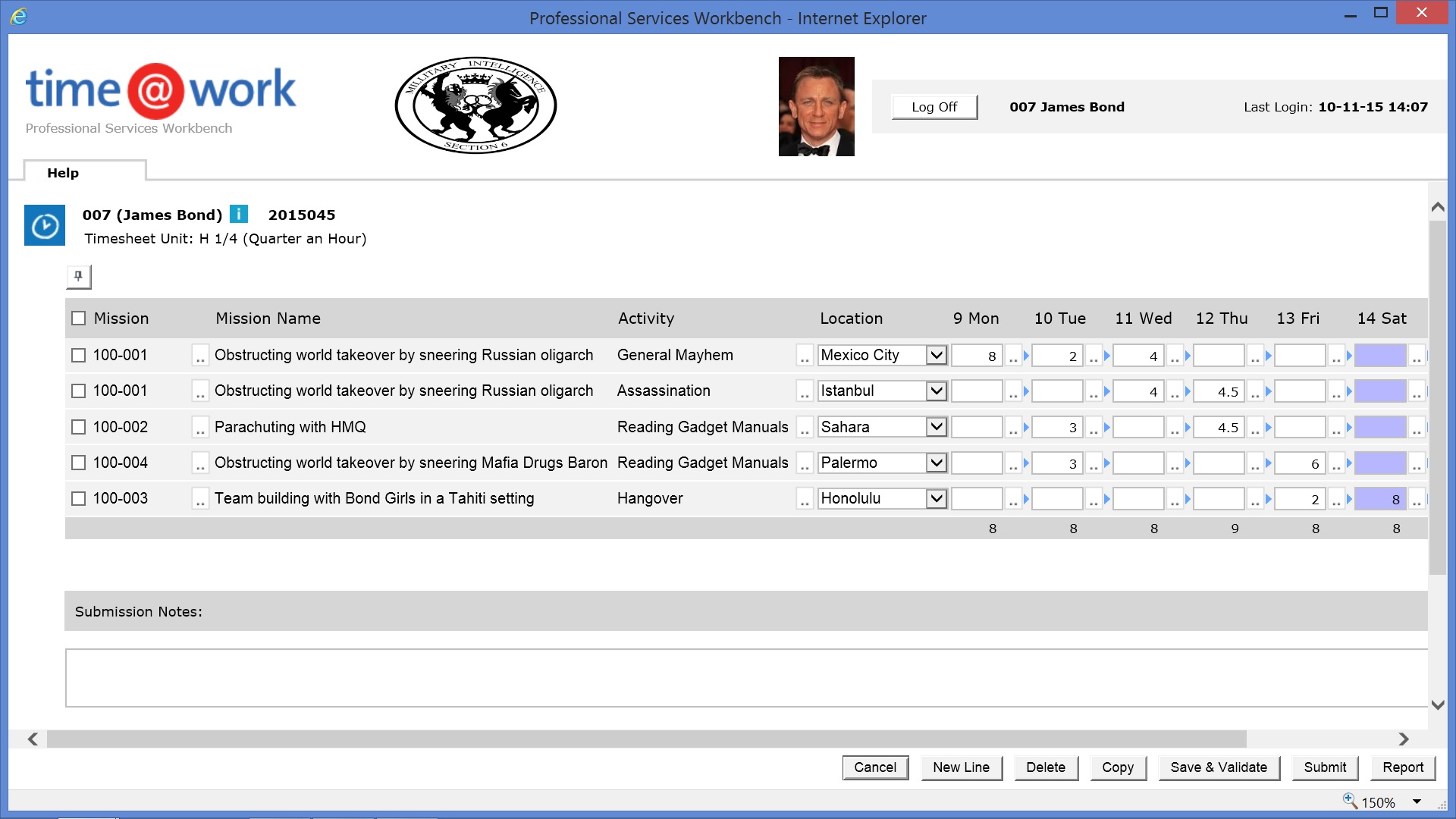
Bond’s Busy Week

Timesheet 007

Developing a Software Package – Sometimes the Nightmare Ends

Share

I’ve posted two articles on what you need to think about if you’ve decided to develop a business software package. You might have a fantastically good idea, but developing, marketing, selling and supporting a package isn’t as easy as you might suppose. There’s far more to worry about than logical design.

software pack

The Nightmare

The Nightmare Continues

  1. Have you thought about quality?

If you’re building parameterized software then it’s going to be capable of millions upon millions of permutations. Have you any idea how you’re going to test a sufficient number of these? Or even the most commonly used ones? The more that your package can do, the more ways it can go wrong. The quality level that you aim for is a matter of choice. Perfection is impossible, and near-perfection possibly unaffordable.

  1. Have you thought about documentation?

You’ll need help text (and the capability of multi language help text), reference manuals, installation manuals, user manuals, training manuals, demonstration manuals, and so on. Your customers and resellers expect this (though don’t bother printing them). Electronic versions that can be accessed through a browser will do quite well enough.

  1. How much of the product should you finish before you market it?

Your vision must be complete before you start, with an outline design for everything you intend to develop. You’ll want to sell your package as soon as you can, to make back your investment, but If you sell too soon, you’ll get diverted from your vision, and most dangerously, you’ll find yourself in obscure alleyways of customer-specific code. But if you sell too late, you’ll have used up all your money.

  1. And have you thought of how you’re going to take your package to the market?

If you’re not yourself in possession of an international company, then if you’re going to sell beyond your domestic market you’re going to need distributors and resellers. You’ve got to see things through their eyes. How can they make money from your product? What will be their upfront investment, and their ongoing cost of sales? Is the balance between service revenues and licence fees the right one for them? Can they learn enough about the product quickly enough to be able to present the product and then implement it?

You need to think of the marketing material they’ll need, the return on investment arguments they’ll use, the contracts, the multi-lingual support service, the case studies, the training, the guidelines you’ll give on implementation duration and costs, and so on. If they can’t make money, then there’s no way you will.

And your pricing model has to be one that can, in theory, and even after discounts, return a profit.

But whatever you do, don’t try to set up a reseller network until you’ve won some deals yourself. When recruiting resellers, just as when selling to customers, references are everything.

  1. How are you going to win your first customers?

Whether your first customer is your own or a reseller’s be aware you’re not going to make any money from the first few deals. Your first customers won’t buy your package, however unique, unless you give them a special deal and extraordinary service. It’s hard to sell without references. You have to ‘buy’ the first deals.

  1. And have you thought about how you’re going to keep your development team happy during the long development period?

If you do lose a developer, is his code sufficiently well documented that another can take his place and maintain his code?

  1. Have you designed a feedback mechanism so that your customers’ wishes are reflected in subsequent versions of your package?

If you don’t listen to your customers’ needs, they’ll soon stop paying for maintenance.

  1. Have you made a prudent investment plan to take you from concept to sales?

If you can’t afford the long-term investment that package software requires – the employment, travel, technical and marketing costs that will take you to your goal – then don’t even think of beginning.

My company, systems@work, set out to develop software for professional services (and expense and forms management) more than a decade ago. Did we ask ourselves all these questions when we began?

Some of them, certainly, but by no means all. time@work is a ‘best of breed’ package for services organizations from accountants, engineers and lawyers, to architects, consultants and charity workers. It’s now used by more than 250 companies from Tokyo to Sydney, from London to New York.

If we’d known there were so many questions, we might never have started. During the first few years there were certainly times when we were close to giving up. But if there are two questions we certainly should have asked ourselves more aggressively, they are ‘How are you going to win your first customers?’, and ‘How are you going to take your package to the market?’

We’re securely profitable now, and my anxieties, if any, are operational ones rather than existential ones.

So, if you have a dream and you can answer these questions positively, and if you’ve got nerves of steel, then good luck. After all, someone has to write these packages.

Developing a Software Package – Dream or Nightmare?

Share

In the world of business software development there’s nothing more fun and more challenging than designing packaged software, software that’s designed to adapt itself to the particular circumstances of each customer, without software modification. Basically you’re building software that’s packed with parameters and switches to make it work one way or another. This can be elegantly and well done if you get it right at the start, but if you’re led this way and that way by the demands of each particular customer, you can end up with a dog’s dinner.

software package

Either way, it’s an expensive venture. It costs more to develop this kind of software than code that’s designed for just one purpose, because it takes a lot more time, but the reward, when it comes, is that you can sell the same package time and time again. There’s just one body of code to look after. So, if you’re an expert in a particular area of business, and if you’ve got the right logical imagination, it’s surely an opportunity not to miss.

Or, so you might think.

I’ve done it myself. I’m the designer of systems@work, a single software package designed for professional services management (time@work), expense management (expense@work) and workflow (forms@work).

I’m typical of many a programmer who spent years writing one-off programs for specific businesses. I developed a practice management system for Coopers & Lybrand, in Paradox, from scratch, and adapted another software package for KPMG for the same purpose. So it occurred to me, as it does to so many of us, that if I could only distil what’s common from all the code I’d written or adapted, I could design a single all-purpose package that would, with appropriate parameters and switches, do everything all at once.

People like me dream of a few months’ fervent coding, and then, almost immediately, a crowd of buyers. We dream of license and maintenance revenues rising exponentially, and finally, at the end of the rainbow, a buy-out proposition from an enormous corporation (preferably beginning with M). The rest is a pleasant after-life that won’t involve work.

We know we can do this. We, alone, have that very special idea. We’re up to date with the latest technology. Why not begin at once?

But if you wake up one morning in the after-glow of a dream like this, then close your eyes and dream of something more sensible, like winning the Singles Title at Wimbledon. Only if the dream returns incessantly, and if it survives all the scepticism you can throw at it, should you begin to take it seriously.

But before you spend every last penny of your own or your company’s money, have another cold shower or two and ask yourself some questions – at least sixteen of them.

Here are the first three:

  1. Who are your customers?

There’s a world of difference between the package software market and the market for custom-developed software. Your customers are going to be those who realize that there’s ultimately more security in a general purpose package that’s going to adapt and grow with their business, than in a piece of one-off code for which support may not be eternal.

They’re going to be customers who understand that they won’t use everything the package does, and who will compromise their own needs if the fit is good enough. They are simultaneously buying more than they need, and less. So be ready to sell the idea of compromise. Beware of promising a long list of enhancements to every customer who’s interested, because If that’s the route you choose, you’ll end up with an ugly amalgam of cobbled-together code.

  1. Who are your competitors?

If your customers have decided on a package, then they’re not only going to look at yours. Let’s face it, most software markets are pretty saturated already. At the top end there’s Oracle and SAP, and if you’ve got enough money to buy them, those systems will do just about anything you need. But even if your customer is in the mid-market, then there’s still a crowd of mid-market systems for him to choose from. Does Navision, or SunSystems, or Great Plains, or Exact, or Scala already do exactly what you’re thinking of? Or nearly do it? It’s unlikely that you’re going to write a complete system that covers a company’s needs from payroll, to accounting, CRM, manufacturing, and distribution.

You’re insane if you’re going to embark on a completely new package that fits the ‘integrated’ model. Rather you’re going to be going for the ‘best of breed model’, with the idea that your piece of software is so special that your customers won’t mind fitting it into a tangle of other modules from other package systems. So whatever else you do, make sure you design open interfaces to a broad range of third-party products.

And keep asking yourself, do you really have some special knowledge that will make your software special?

  1. How are you going to make it simple enough but flexible enough to fit a broad range of customer needs?

This is the difficult part to get just right. If you’re going to appeal to sufficiently large numbers of customers to cover your investment, your package is going to be complex. It’s going to have screens of parameters that make it work one way for one customer and another way for another. After all, if it’s a package, you’re only writing one piece of code. If you end up with multiple versions for multiple needs, then your dream will become a nightmare before you’ve even sold five copies. So, think about your market, and choose just enough of it to make your coverage sufficient whilst making it possible for your customers to understand the software they’re buying.

More questions in a day or two…

Designing systems@work – with a little inspiration from SunSystems

Share

I’ve spent the last few years designing systems@work’s time@work (for professional services management), expense@work (for expense management) and forms@work (for forms and workflow management), three highly configurable software packages all inspired by SunSystems financial and business software.

s@w small

SunSystems was developed by colleagues of mine who formed Systems Union in the 1980s. It’s still the mainstay of LLP Group, a SunSystems reseller and consulting group which I founded in Prague in 1992.

SunSystems’ excellence lies in a few remarkably simple concepts:

  • A single ‘unified ledger‘ handling accounts payable (AP), accounts receivable (AR), general ledger (GL) and fixed asset ledger transactions. Accounts of types Creditor, Debtor, Client (both Debtor and Creditor), Profit & Loss, Balance Sheet, and Memo accounts all co-exist in a single chart of accounts. The unified ledger idea actually spawned at least two well-known accounting software systems – CODA, and SunSystems, both British.
  • The use of transaction analysis codes instead of structured general ledger codes for the purposes of management accounting and statutory reporting (VAT reporting, for example). An analysis code need be set up only once, and then selected and posted during journal entry to any account that is defined as requiring it. The chart of accounts thereby remains simple.
  • The option to set up additional analysis on other entities (such as Account Codes and Asset Codes) for reporting purposes (this makes the translation of reports from corporate to local account codes easy, or vice versa)
  • The use of parallel ledgers for budgeting or alternative treatments (e.g. alternative asset depreciations). Each user-definable budget ledger has the same structure as the ‘Actuals’ ledger.
  • The option to enter ‘other amount’ and ‘currency code’ values on any transaction in any ledger (in the latest version of SunSystems you may enter five amount fiels and four currency codes)
  • The use of additional ledger fields for asset codes, etc.

The result is an extremely simple, easy to understand, ‘flat’ structure (reflected in a non-normalised database) that is nevertheless extremely powerful and flexible. In terms of database tables, the essentials include:

  • A Chart of Accounts table
  • Ledger tables (an ‘Actuals’ ledger and a number of parallel ‘Budget’ ledgers)
  • Optionally, a Fixed Assets table

Everything else is merely supportive.

The advantages are many:

  • No issues reconciling AP, AR and GL
  • Reporting tools that can range easily across transactions on any type of account and in any set of ledgers
  • It’s easy to set up new analytical dimensions at any time
  • It’s easy to handle multiple currencies (typically local currency values that must balance, transaction currency values (e.g. foreign expenses), and reporting currency values (enabling consolidation of several ledgers in a single corporate currency)

The product was also designed with language translation in mind – all textual terms being held in files external to the program files.

It’s not surprising that SunSystems remains an excellent choice for corporations planning to use a single system across the globe. It can be rapidly implemented in a standard way, meeting corporate and local requirements simultaneously.

I spent many years implementing SunSystems in many parts of the world and came to appreciate the powerful simplicity of its design. In designing time@work I adopted many of these ideas and in some cases took them one, necessary, step further:

  • A single ‘Actuals’ ledger containing transactions of all kinds, whether originating in timesheets, forms, invoices, or attendance forms
  • Any number of parallel ledgers of exactly the same structure for planning and other purposes
  • Analysis values on transactions (the same set of 50 dimensions available for use on timesheets, forms, and invoices across all ledgers)
  • Analysis on entities (Clients, Projects, Tasks, Employees)
  • Multiple value fields on each transaction (20 values, and 20 ‘currency’ codes to identify the currency in which each value is expressed)
  • Reporting tools that can range across multiple ledgers
  • Data Dictionaries accessible to the end-user where different language texts are held, as well as industry specific textual alternatives (e.g. engagement, or case, instead of project)

Where I extended the design was to enable multi-company functionality in a single database, making it possible for an organisation to define one set of projects and one set of employees for use group-wide. In a professional services organisation this makes it easy for an employee belonging to one company to report time or expenses against a project belonging to another company, and makes it possible for an employee in one company to manage employees and projects in another, and to be involved in workflow regardless of the company to which an employee or project belongs.

Multi-company capability, though, implies at least the following:

  • The need to handle multiple base currencies (an organisation may be operating in several countries but may still need to see employees and projects as a single pool). Holding the currency code on each of twenty values in every ledger transaction makes this possible.
  • The need for multiple charts of accounts. When transactions must be sent from systems@work software to one or more finance systems the appropriate transactions for each company must be easily identifiable and must be constructed using the appropriate account codes for the destination ledger
  • The need for separate invoice sequences
  • The need for separate sets of expense types, each appropriately implying a general ledger code

Achieving all of this, whilst retaining simplicity on the surface has been our aim. The result is a set of simple components that can be assembled in millions of different ways to meet the needs of a wide range of organisations, without software modification.

systems@work works with any finance system, but it’s conceptual similarities with SunSystems makes it an ideal extension for timesheets, expenses, planning and billing. Contact me for more information.

On Integration – Developing Software with Integration in Mind

Share

I’ve posted two articles on the challenges of systems integration, firstly on the advantages and disadvantages of Best-of-Breed and Fully Integrated Solutions, and secondly on how to approach integration if you’ve chosen Best-of-Breed.

See Systems Integration and Reducing the Risks.

This post is concerned with how software should be developed if integration is anticipated.

integration3

You can think of it in this way:

Systems respond to EVENTS by executing software PROCESSES that update DATA.

In a single ‘fully integrated’ system the ‘complete’ response to an EVENT is contained entirely in one system and is reflected in one set of DATA. ‘Fully integrated’ systems can thus always ensure a complete response to an EVENT or no response, but are rarely left in an incomplete state resulting from partial processing. Typically, databases roll back incomplete PROCESSES, and all the consequent DATA changes, if there is a failure at any stage. It’s all or nothing, if you want it to be.

Integrating best-of-breed systems, working with more than one database, makes it more difficult to achieve this kind of integrity. The failure of a PROCESS in one system can’t easily trigger the roll-back of a PROCESS in the other.

Integrating separate systems requires therefore that you should easily be able to identify the success or failure of each part of a PROCESS and identify and control each set of DATA changes that each PROCESS effects.

For example, suppose you’re a company that distributes imported goods and you’re obsessive about calculating the margin you obtain on each product (this may be for good statutory tax reasons, or simply because you are unnaturally pedantic). The cost of the goods you sell is determined by the price you pay for them, the duties you pay on importing them and the cost of transporting them to your warehouse. You only know the true cost of each product once you’ve received the invoices that make up all of these costs. But, in the meantime, you may have shipped them.

Let’s consider an EVENT such as the arrival of an invoice for transportation. If the calculation of ‘actual’ costs is automated then your system must carry out the following PROCESSES:

  1. Invoice Registration: The invoice is booked against supplier, tax and cost accounts.
  2. Accrual Reversal: If an accrual for this cost has been made earlier it must be reversed.
  3. Stock Value Correction: The difference between accrued and actual transportation cost must be calculated and allocated against all the stock items it is related to.
  4. Cost of Goods Sold Correction: If there are items to which this difference in cost relates that have already been sold, then the appropriate portion of this difference must be allocated to a cost of goods sold account rather than to an inventory account.

Each step involves updating transaction tables, and if all these PROCESSES are occurring in a single integrated system then either they all succeed or they all fail, and the database either reflects a complete response to the EVENT or no response at all.

But if your finance system is separated from your manufacturing system then some of these PROCESSES must be carried out in one system and some in the other (and parts of some in both). It’s likely also that they will take place at different times (if there is ‘batch update’ of one system by the other rather than immediate update). It doesn’t matter for the moment which. In consequence it is possible that taken together the systems may reflect a partial response to an EVENT.

When developing systems that must be capable of handling partial failure in response to an EVENT the following approaches are wise:

  • Ideally there should be an explicit database table that identifies for each uniquely identifiable EVENT the PROCESSES that have been completed successfully and which are therefore fully reflected in the system’s database. Ideally such tables are present in the system that is sending and the system that is receiving. In reality, it is the state of the data that implies whether a PROCESS is complete, and it is rare to find an explicit table that records this separately, but it would certainly be useful. However the success of each PROCESS is recorded, the changes in data associated with each PROCESS should be easy to identify.
  • Transaction data that have been processed by an interface program must be marked as such.
  • All modifications to data that imply additional interface processes should be handled with a full audit trail. Ideally a modification to a transaction involves the insertion of both a reversal of the earlier transaction and a new transaction.
  • All transactions should have a field that identifies the order of events. Ideally this should be a date/time stamp. This enables execution of interfaces in the correct sequence, as well as the unwinding of PROCESSES if required.

If these safeguards are observed reconciliation and correction should not be too difficult.

System integration isn’t easy and there is no reason to believe it will get easier. There are still no standards for the description of data to which all system developers and integrators can refer. This is no surprise. Data are not objective objects which can be explored and described without reference to purpose, context and culture, and they never will be. They are not like the objects of material science; they are human artefacts.

Over the last decades I have witnessed a number of false dawns with regard to ‘easier integration’. These usually turn out to be useful advances in technology but rarely make functional integration any easier.

Two weeks ago I read an article on Data-centre Software in The Economist (Sept 19th 2015). That’s what made me think about integration issues. The article mentions Docker, a successful startup that’s making it easier and more efficient to move applications from one cloud to another. Laudable, clever technology, but, as far as I can tell, it represents no progress in the more difficult task of integrating business processes. Those of us who do such work can be assured of work for many decades to come.