Designing systems@work – with a little inspiration from SunSystems

Share

I’ve spent the last few years designing systems@work’s time@work (for professional services management), expense@work (for expense management) and forms@work (for forms and workflow management), three highly configurable software packages all inspired by SunSystems financial and business software.

s@w small

SunSystems was developed by colleagues of mine who formed Systems Union in the 1980s. It’s still the mainstay of LLP Group, a SunSystems reseller and consulting group which I founded in Prague in 1992.

SunSystems’ excellence lies in a few remarkably simple concepts:

  • A single ‘unified ledger‘ handling accounts payable (AP), accounts receivable (AR), general ledger (GL) and fixed asset ledger transactions. Accounts of types Creditor, Debtor, Client (both Debtor and Creditor), Profit & Loss, Balance Sheet, and Memo accounts all co-exist in a single chart of accounts. The unified ledger idea actually spawned at least two well-known accounting software systems – CODA, and SunSystems, both British.
  • The use of transaction analysis codes instead of structured general ledger codes for the purposes of management accounting and statutory reporting (VAT reporting, for example). An analysis code need be set up only once, and then selected and posted during journal entry to any account that is defined as requiring it. The chart of accounts thereby remains simple.
  • The option to set up additional analysis on other entities (such as Account Codes and Asset Codes) for reporting purposes (this makes the translation of reports from corporate to local account codes easy, or vice versa)
  • The use of parallel ledgers for budgeting or alternative treatments (e.g. alternative asset depreciations). Each user-definable budget ledger has the same structure as the ‘Actuals’ ledger.
  • The option to enter ‘other amount’ and ‘currency code’ values on any transaction in any ledger (in the latest version of SunSystems you may enter five amount fiels and four currency codes)
  • The use of additional ledger fields for asset codes, etc.

The result is an extremely simple, easy to understand, ‘flat’ structure (reflected in a non-normalised database) that is nevertheless extremely powerful and flexible. In terms of database tables, the essentials include:

  • A Chart of Accounts table
  • Ledger tables (an ‘Actuals’ ledger and a number of parallel ‘Budget’ ledgers)
  • Optionally, a Fixed Assets table

Everything else is merely supportive.

The advantages are many:

  • No issues reconciling AP, AR and GL
  • Reporting tools that can range easily across transactions on any type of account and in any set of ledgers
  • It’s easy to set up new analytical dimensions at any time
  • It’s easy to handle multiple currencies (typically local currency values that must balance, transaction currency values (e.g. foreign expenses), and reporting currency values (enabling consolidation of several ledgers in a single corporate currency)

The product was also designed with language translation in mind – all textual terms being held in files external to the program files.

It’s not surprising that SunSystems remains an excellent choice for corporations planning to use a single system across the globe. It can be rapidly implemented in a standard way, meeting corporate and local requirements simultaneously.

I spent many years implementing SunSystems in many parts of the world and came to appreciate the powerful simplicity of its design. In designing time@work I adopted many of these ideas and in some cases took them one, necessary, step further:

  • A single ‘Actuals’ ledger containing transactions of all kinds, whether originating in timesheets, forms, invoices, or attendance forms
  • Any number of parallel ledgers of exactly the same structure for planning and other purposes
  • Analysis values on transactions (the same set of 50 dimensions available for use on timesheets, forms, and invoices across all ledgers)
  • Analysis on entities (Clients, Projects, Tasks, Employees)
  • Multiple value fields on each transaction (20 values, and 20 ‘currency’ codes to identify the currency in which each value is expressed)
  • Reporting tools that can range across multiple ledgers
  • Data Dictionaries accessible to the end-user where different language texts are held, as well as industry specific textual alternatives (e.g. engagement, or case, instead of project)

Where I extended the design was to enable multi-company functionality in a single database, making it possible for an organisation to define one set of projects and one set of employees for use group-wide. In a professional services organisation this makes it easy for an employee belonging to one company to report time or expenses against a project belonging to another company, and makes it possible for an employee in one company to manage employees and projects in another, and to be involved in workflow regardless of the company to which an employee or project belongs.

Multi-company capability, though, implies at least the following:

  • The need to handle multiple base currencies (an organisation may be operating in several countries but may still need to see employees and projects as a single pool). Holding the currency code on each of twenty values in every ledger transaction makes this possible.
  • The need for multiple charts of accounts. When transactions must be sent from systems@work software to one or more finance systems the appropriate transactions for each company must be easily identifiable and must be constructed using the appropriate account codes for the destination ledger
  • The need for separate invoice sequences
  • The need for separate sets of expense types, each appropriately implying a general ledger code

Achieving all of this, whilst retaining simplicity on the surface has been our aim. The result is a set of simple components that can be assembled in millions of different ways to meet the needs of a wide range of organisations, without software modification.

systems@work works with any finance system, but it’s conceptual similarities with SunSystems makes it an ideal extension for timesheets, expenses, planning and billing. Contact me for more information.

On Integration – Developing Software with Integration in Mind

Share

I’ve posted two articles on the challenges of systems integration, firstly on the advantages and disadvantages of Best-of-Breed and Fully Integrated Solutions, and secondly on how to approach integration if you’ve chosen Best-of-Breed.

See Systems Integration and Reducing the Risks.

This post is concerned with how software should be developed if integration is anticipated.

integration3

You can think of it in this way:

Systems respond to EVENTS by executing software PROCESSES that update DATA.

In a single ‘fully integrated’ system the ‘complete’ response to an EVENT is contained entirely in one system and is reflected in one set of DATA. ‘Fully integrated’ systems can thus always ensure a complete response to an EVENT or no response, but are rarely left in an incomplete state resulting from partial processing. Typically, databases roll back incomplete PROCESSES, and all the consequent DATA changes, if there is a failure at any stage. It’s all or nothing, if you want it to be.

Integrating best-of-breed systems, working with more than one database, makes it more difficult to achieve this kind of integrity. The failure of a PROCESS in one system can’t easily trigger the roll-back of a PROCESS in the other.

Integrating separate systems requires therefore that you should easily be able to identify the success or failure of each part of a PROCESS and identify and control each set of DATA changes that each PROCESS effects.

For example, suppose you’re a company that distributes imported goods and you’re obsessive about calculating the margin you obtain on each product (this may be for good statutory tax reasons, or simply because you are unnaturally pedantic). The cost of the goods you sell is determined by the price you pay for them, the duties you pay on importing them and the cost of transporting them to your warehouse. You only know the true cost of each product once you’ve received the invoices that make up all of these costs. But, in the meantime, you may have shipped them.

Let’s consider an EVENT such as the arrival of an invoice for transportation. If the calculation of ‘actual’ costs is automated then your system must carry out the following PROCESSES:

  1. Invoice Registration: The invoice is booked against supplier, tax and cost accounts.
  2. Accrual Reversal: If an accrual for this cost has been made earlier it must be reversed.
  3. Stock Value Correction: The difference between accrued and actual transportation cost must be calculated and allocated against all the stock items it is related to.
  4. Cost of Goods Sold Correction: If there are items to which this difference in cost relates that have already been sold, then the appropriate portion of this difference must be allocated to a cost of goods sold account rather than to an inventory account.

Each step involves updating transaction tables, and if all these PROCESSES are occurring in a single integrated system then either they all succeed or they all fail, and the database either reflects a complete response to the EVENT or no response at all.

But if your finance system is separated from your manufacturing system then some of these PROCESSES must be carried out in one system and some in the other (and parts of some in both). It’s likely also that they will take place at different times (if there is ‘batch update’ of one system by the other rather than immediate update). It doesn’t matter for the moment which. In consequence it is possible that taken together the systems may reflect a partial response to an EVENT.

When developing systems that must be capable of handling partial failure in response to an EVENT the following approaches are wise:

  • Ideally there should be an explicit database table that identifies for each uniquely identifiable EVENT the PROCESSES that have been completed successfully and which are therefore fully reflected in the system’s database. Ideally such tables are present in the system that is sending and the system that is receiving. In reality, it is the state of the data that implies whether a PROCESS is complete, and it is rare to find an explicit table that records this separately, but it would certainly be useful. However the success of each PROCESS is recorded, the changes in data associated with each PROCESS should be easy to identify.
  • Transaction data that have been processed by an interface program must be marked as such.
  • All modifications to data that imply additional interface processes should be handled with a full audit trail. Ideally a modification to a transaction involves the insertion of both a reversal of the earlier transaction and a new transaction.
  • All transactions should have a field that identifies the order of events. Ideally this should be a date/time stamp. This enables execution of interfaces in the correct sequence, as well as the unwinding of PROCESSES if required.

If these safeguards are observed reconciliation and correction should not be too difficult.

System integration isn’t easy and there is no reason to believe it will get easier. There are still no standards for the description of data to which all system developers and integrators can refer. This is no surprise. Data are not objective objects which can be explored and described without reference to purpose, context and culture, and they never will be. They are not like the objects of material science; they are human artefacts.

Over the last decades I have witnessed a number of false dawns with regard to ‘easier integration’. These usually turn out to be useful advances in technology but rarely make functional integration any easier.

Two weeks ago I read an article on Data-centre Software in The Economist (Sept 19th 2015). That’s what made me think about integration issues. The article mentions Docker, a successful startup that’s making it easier and more efficient to move applications from one cloud to another. Laudable, clever technology, but, as far as I can tell, it represents no progress in the more difficult task of integrating business processes. Those of us who do such work can be assured of work for many decades to come.

Forms and Data Capture using an iPhone

Share

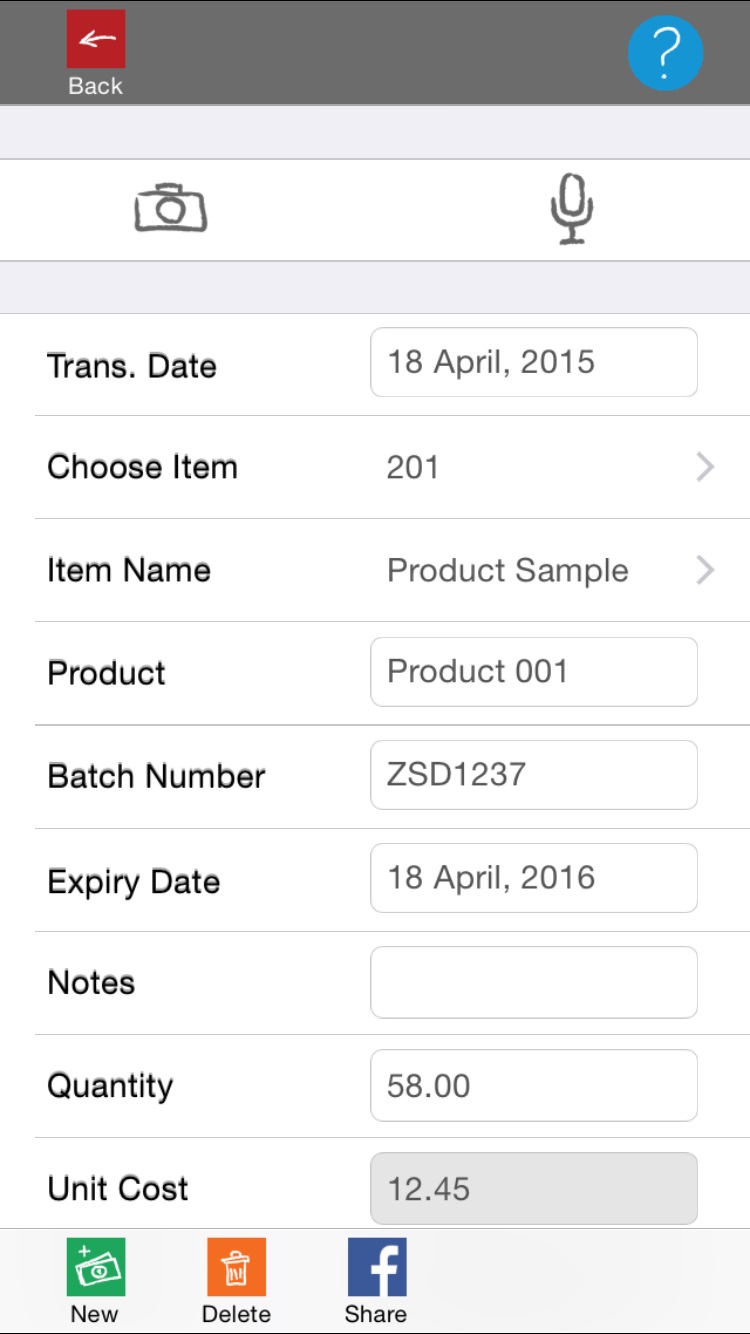
We’ve just released a demonstration version of an App that works with our forms@work business software.

forms@work lets you define forms for the capture of data, as well as authorisation workflow rules, and any amount of reporting and export to other systems.

You might use forms@work for such purposes as:

  • Absence request management (holidays, and other planned absences)
  • Mileage capture for personal or pool cars
  • Purchase requests
  • Product sample requests (common in pharmaceutical companies)
  • Marketing event proposals
  • Expenses
  • Sales reporting

f@w1

The forms@work App works online and offline, downloading forms definitions from your server, together with all the data lists that each form needs. You can also capture images and voice memos before uploading data to the central server.

Download forms@work from the App Store and give it a try.

f@w2

The forms@work App lets you capture:

  • Photos
  • Voice Memos
  • Hierarchical data (3 levels)
  • Date fields
  • Date time fields
  • Time fields
  • Text fields
  • Lookup fields
  • Numeric fields
  • Values for calculations such as quantities and prices (in definable currencies)